
Video Repair Tool — User Guide
A step-by-step walkthrough to help you diagnose corrupted video files, preview repaired frames, and restore smooth playback.
Prefer a 2-Minute Video Walkthrough?
Watch real desktop execution from file selection to conversion complete.
Before You Begin — Quick Checklist
Key requirements and preparation steps before you start
Standalone Operation
Runs independently. Microsoft Outlook, Exchange, or third-party email clients are not required.
Source Files
The tool reads your source files to convert them. Keep a backup of important data before you start.
Local Processing
Conversion runs on your computer. Only cloud destinations you choose send data to those services.
Free Evaluation
Free evaluation: diagnose corruption and preview up to 1 minute of repaired video. Full export requires a paid license.
Complete 6-Step Execution Guide
Import Corrupted Video Files
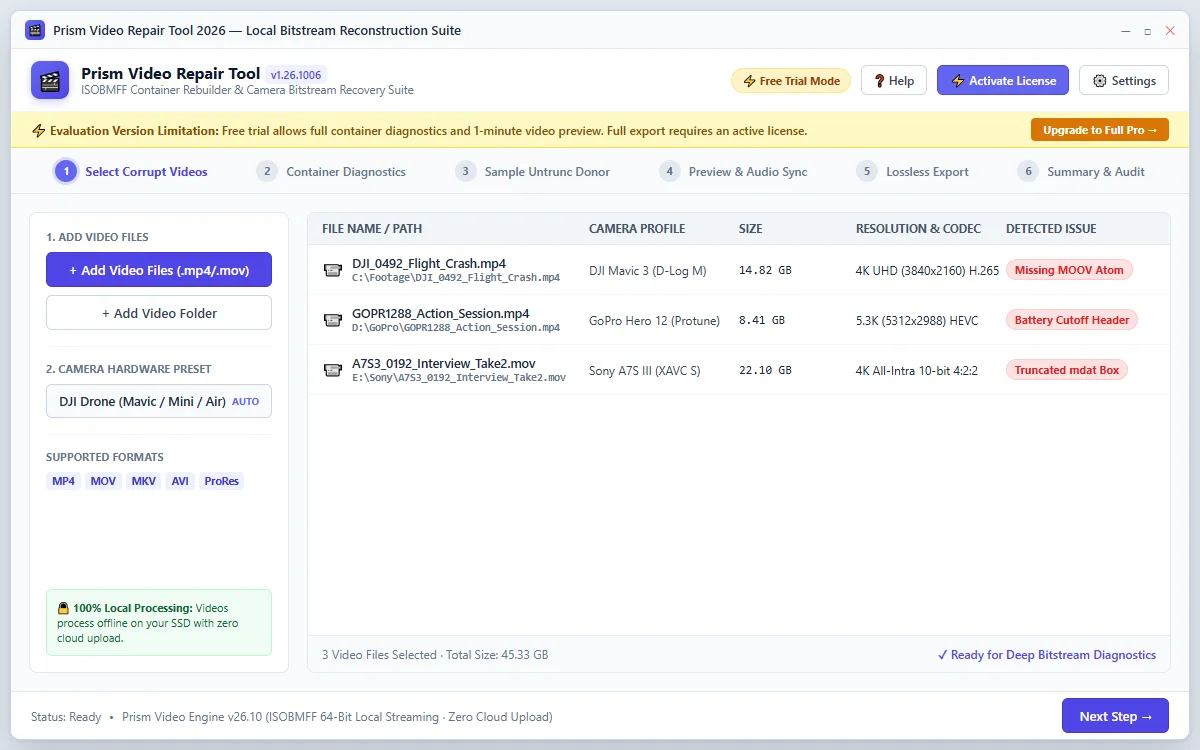
Click + Add Video or drag and drop your corrupted video files into the application window. The tool automatically detects camera hardware metadata and codec specifications.
Quick Steps
- 1
Click + Add Video and select your unplayable video recording.
- 2
The software inspects the container header and identifies camera parameters.
- 3
Click Next: Run Diagnostics → to analyze the damage.
Tip: You can queue multiple corrupted videos simultaneously for batch processing.
Deep Container Diagnostics & Analysis
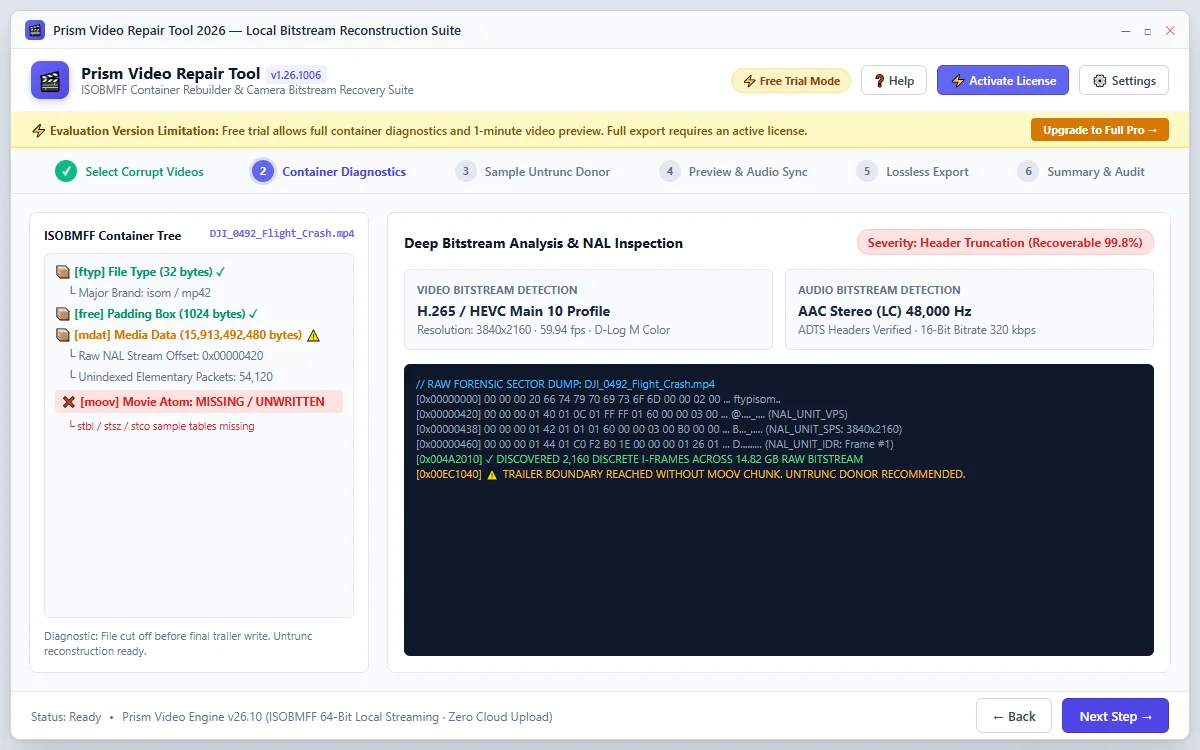
The forensics engine analyzes ISOBMFF atom structures, checks the mdat media payload, detects missing MOOV atoms, and flags playback error codes (0xc00d36c4, 0xc00d5212, QuickTime 2048).
Quick Steps
- 1
View the real-time atom tree and corruption severity score.
- 2
The tool automatically detects if codec headers or seek tables are damaged.
- 3
Proceed to automatic header rebuilding or sample repair.
Tip: Standard index corruptions are repaired automatically in seconds.
Advanced Sample Repair (Reference Video)
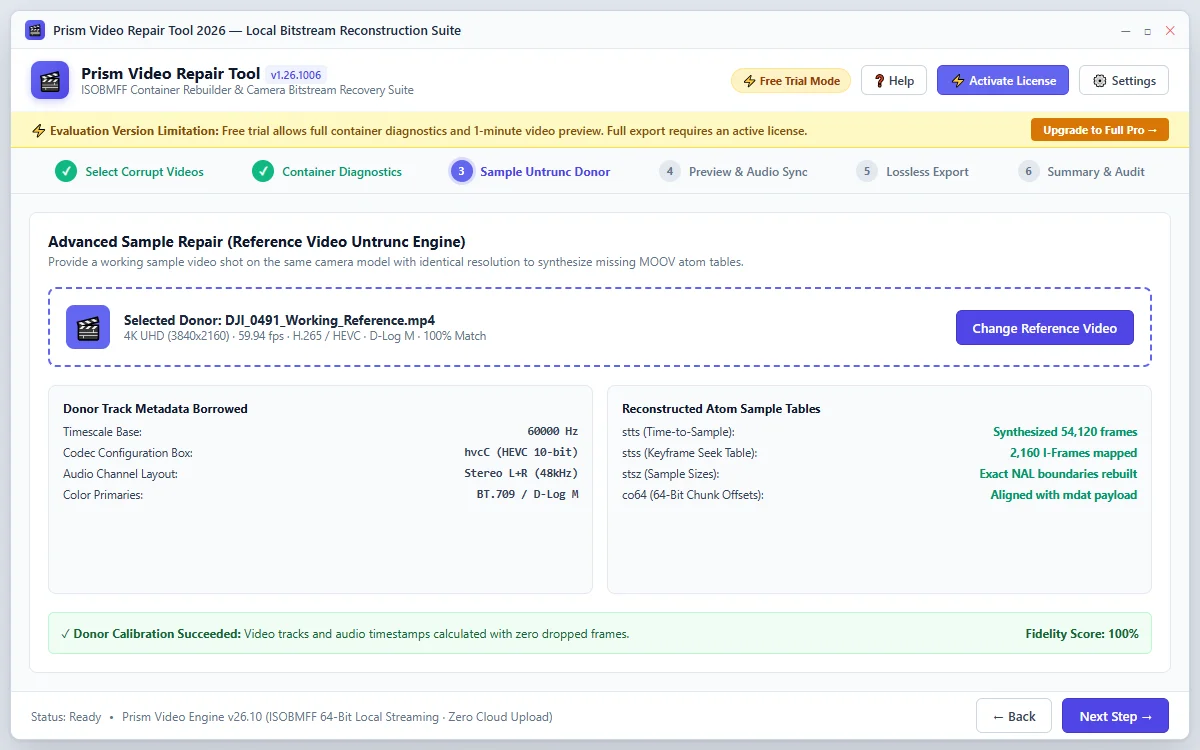
For unfinalized videos cut short by drone crashes or sudden battery power loss, provide a working reference video recorded on the same camera model with identical resolution to synthesize missing sample tables.
Quick Steps
- 1
Click Select Reference Video and choose a healthy video from the same camera.
- 2
The Untrunc engine extracts timescale and codec sample parameters from the donor.
- 3
Click Synthesize Headers to reconstruct the damaged bitstream index.
Tip: A 10-second working clip from the same device is sufficient to restore hours of lost footage.
Preview Repaired Video & Audio Sync
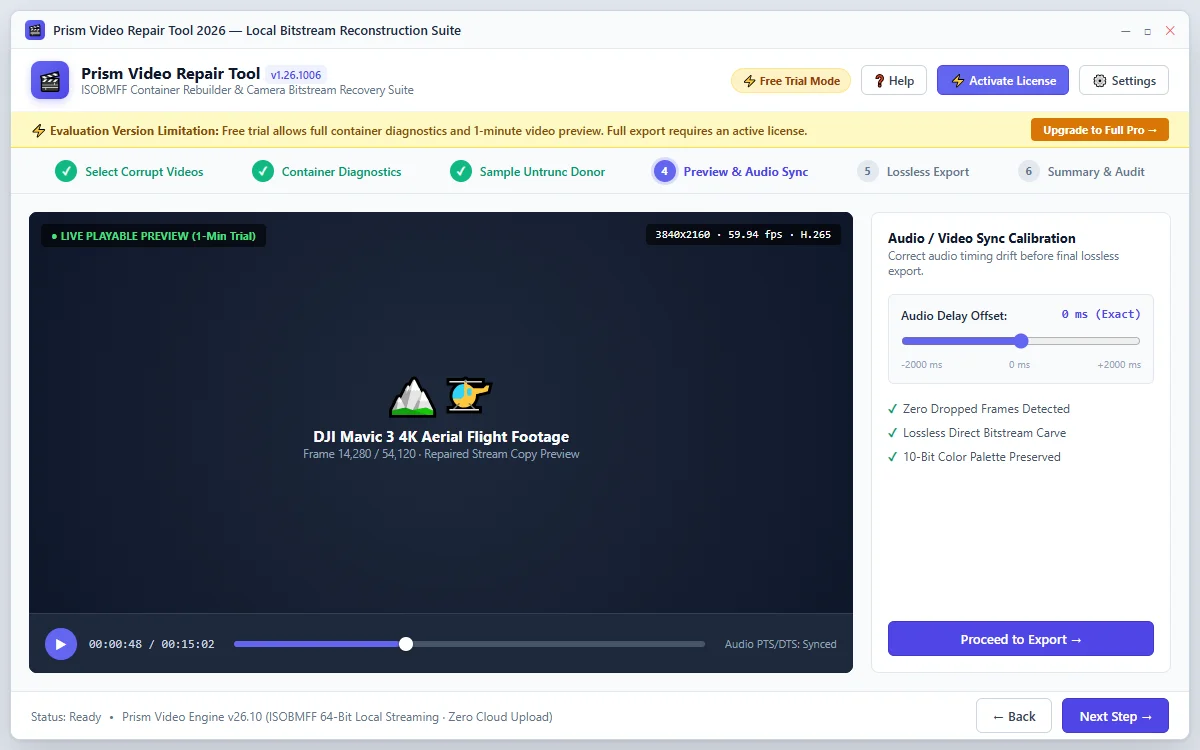
Watch your restored video in the integrated media player. Use the real-time audio delay slider (-2000ms to +2000ms) to calibrate audio-video synchronization if drift occurred.
Quick Steps
- 1
Click Play to watch the 1-minute high-definition preview.
- 2
Scrub through the timeline to verify frame integrity and color grading.
- 3
Adjust the Audio Sync slider if audio leads or lags behind video.
Tip: The preview allows you to verify picture clarity before exporting the final file.
Lossless Stream Copy Export
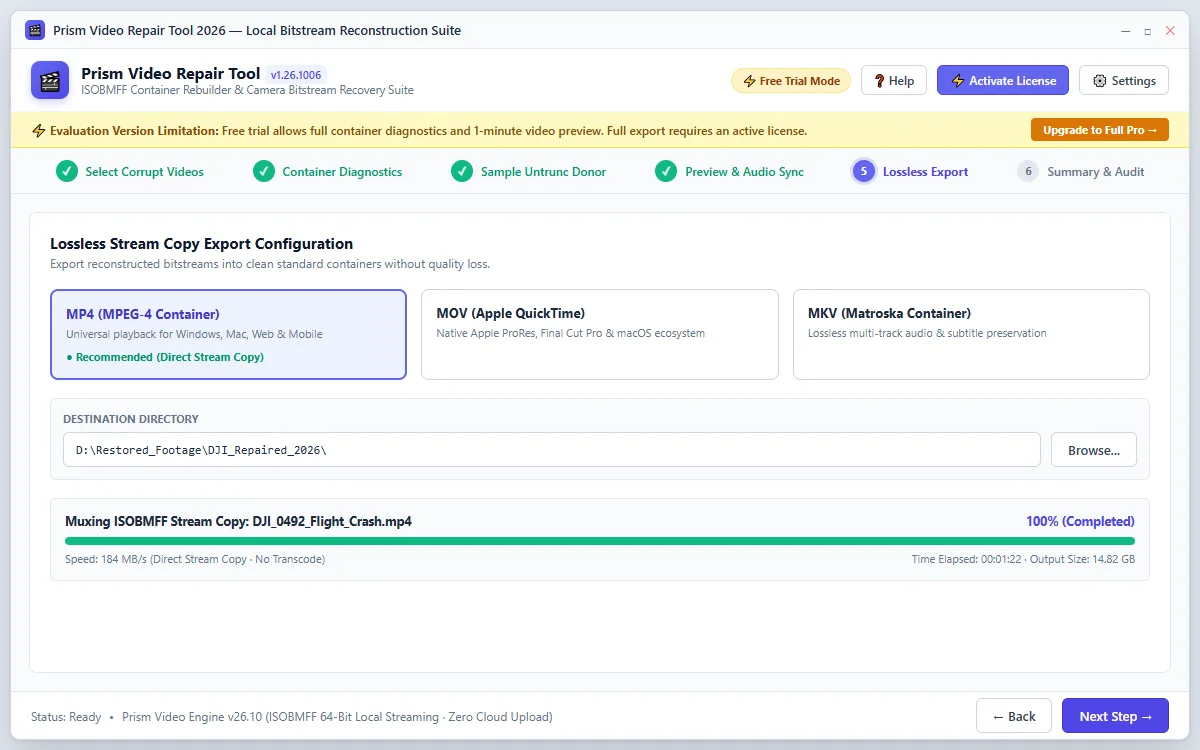
Select your export container format (MP4, MOV, or MKV) and output folder. The direct stream copy engine muxes the repaired bitstream without re-compressing video frames, preserving 100% original quality.
Quick Steps
- 1
Choose your target container (MP4, MOV, MKV).
- 2
Select a destination folder on your local SSD or hard drive.
- 3
Click Start Lossless Export to write the repaired video.
Tip: Direct stream copy runs up to 50x faster than traditional video converters.
Verification & Output Inspection
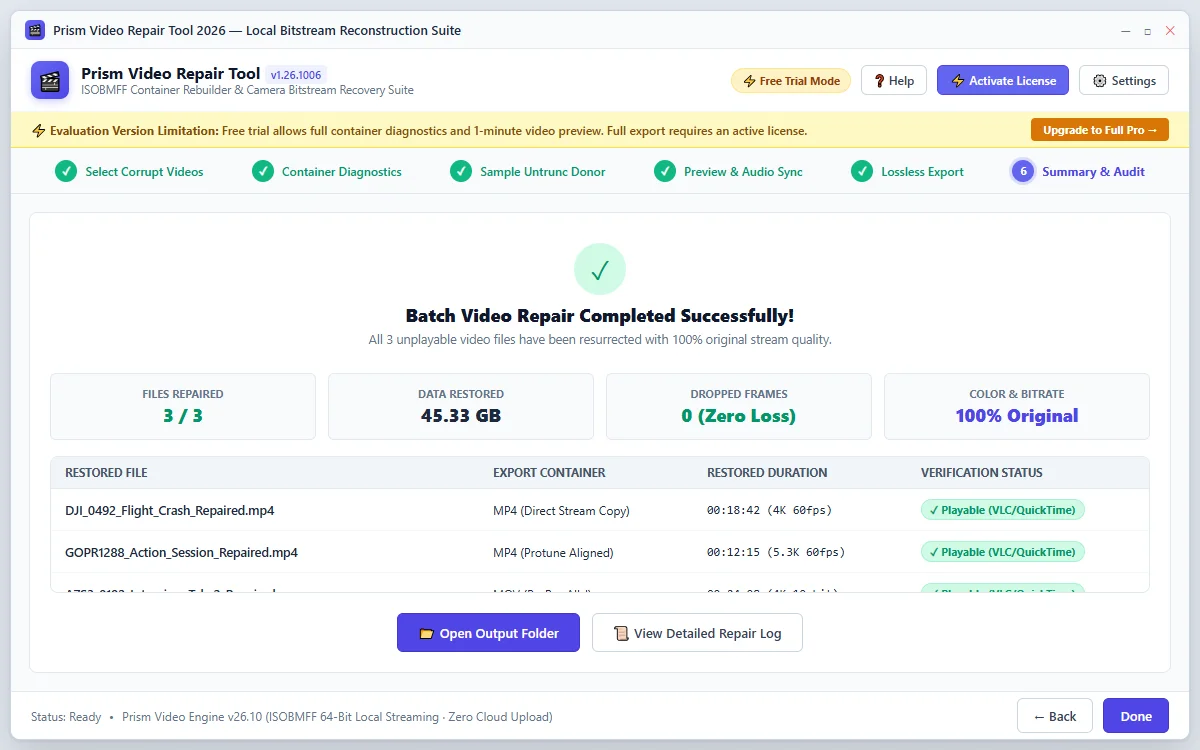
Once export completes, click Open Output Folder to access your finalized video files. The repaired file is fully standardized and opens smoothly in VLC, Windows Media Player, QuickTime, Premiere Pro, and Final Cut Pro.
Quick Steps
- 1
Review the export audit summary.
- 2
Click Open Output Folder to view your restored videos.
- 3
Play your video in standard media players or import into editing software.
Tip: Your original damaged file is never modified or overwritten during repair.
Questions About Conversion or Setup?
Find detailed troubleshooting, format limits, and licensing answers in our dedicated FAQ section.
Step Navigation
6 StagesSystem Requirements
Ready to Migrate?
Official license key. Choose 1, 2, or 3-year validity with no recurring subscription.
Get License Plan Or Download Free Trial →Free evaluation: diagnose corruption and preview up to 1 minute of repaired video. Full export requires a paid license.
